

Updated 17th July 2026
Website accessibility for charities: Your complete guide to AA and AAA standards
Charity website accessibility isn't optional. Under the Equality Act 2010, the European Accessibility Act and the Public Sector Bodies Accessibility Regulations, UK charities and NGOs face growing digital accessibility requirements - and beneficiaries, donors and volunteers all expect a site they can actually use.
This guide explains what WCAG 2.2 AA and AAA standards mean in plain English, where the legal lines sit, and the practical fixes that make the biggest difference on a charity or NGO website. Accessibility goes beyond compliance - the digital space is the primary route for fundraising, service delivery and advocacy, and inaccessible pages block the people who need you most.
Why Website Accessibility Matters for Charities
For charities, accessibility goes beyond compliance; it is fundamental to the organisations goals. Today, the digital space is the primary means for fundraising, service delivery, and advocacy. Ensuring your website is accessible means your beneficiaries can find help and your donors can give support, all without barriers.
UK and EU Accessibility Regulations
Recent years have seen a tightening of digital regulations across the UK and Europe. The regulatory landscape is shifting from voluntary guidelines to mandatory legal requirements. Ignoring these new rules can lead to both reputational damage and legal challenges.
Legal, Ethical, and Practical Responsibilities
Ethically, charities have a duty to serve the most vulnerable, many of whom may live with disabilities. Practically, an accessible website improves SEO, extends audience reach, and significantly enhances the user experience for all visitors, not just those using assistive technology. Legally, failure to meet standards discriminates against disabled users, an issue in established equality law.
Digital Accessibility Requirements for UK Charities and NGOs
The European Accessibility Act (EAA)
The European Accessibility Act (EAA) came into force on 28th June 2025 and marked a significant shift in digital legislation. It requires that a wide range of products and services, including e-commerce services and websites, must be accessible to persons with disabilities. Providers already lawfully operating on that date have a transition period until 28 June 2030. Though this is an EU law, it applies to any UK charity that operates, sells goods or solicits donations within the EU.
The EAA aims to standardise accessibility requirements across member states, meaning a single standard of inclusivity will apply. Charities must ensure their digital platforms are Perceivable, Operable, Understandable, and Robust (POUR).
Accessibility Requirements Under UK Law
Equality Act 2010
In the UK, the Equality Act 2010 requires service providers to make 'reasonable adjustments'. For charity websites, that means meeting digital accessibility requirements - if a disabled person can't donate or read your services page because of poor design, that's likely to be considered discrimination.
Public Sector Bodies Accessibility Regulations
The Public Sector Bodies (Websites and Mobile Applications) (No. 2) Accessibility Regulations 2018 specifically mandate that public sector websites must meet WCAG 2.2 AA standards (the regulations now refer to the latest published version of WCAG, which is currently WCAG 2.2). While many charities are not "public sector bodies," those receiving significant public funding or delivering statutory services often contractually agree to meet these same rigorous standards.
WCAG 2.2 is Now the UK Public Sector Standard
The Web Content Accessibility Guidelines (WCAG) are the international benchmark. WCAG 2.2 was published in October 2023, and the UK Public Sector Bodies Accessibility Regulations now point to the latest published version of WCAG, meaning WCAG 2.2 AA is the current requirement for in-scope organisations.
WCAG 2.2 introduced nine new success criteria focused on users with low vision, cognitive disabilities and motor impairments, particularly on mobile devices. Key additions include:
- Focus not obscured: Ensuring interactive elements remain visible when selected by a keyboard.
- Dragging movements: Providing single-click alternatives to dragging actions (e.g., on maps or sliders).
- Target size: Ensuring buttons and touch targets are large enough (minimum 24x24 CSS pixels) to be easily tapped.
What Are AA and AAA Accessibility Standards?
Understanding WCAG and the POUR Principles
Accessibility is measured against the WCAG framework, which is built on four principles:
- Perceivable: Information must be presented in ways users can perceive (e.g., text alternatives for images).
- Operable: Users must be able to navigate the website (e.g., keyboard compatibility).
- Understandable: Information and use must be clear (e.g., readable text, predictable navigation).
- Robust: Content must be interpretable by various technologies (e.g., screen readers).
What Is AA Accessibility?
Level AA is the mid-range compliance level and is the globally accepted standard for most websites. It addresses the most common barriers for disabled users. For a charity, achieving AA compliance means your site is accessible to people with blindness, low vision, deafness, and mobility impairments.
Why AA is the Baseline for Charities
AA compliance strikes a balance between accessibility and design flexibility. It is the standard referenced in the UK government's accessibility regulations and the EAA. Meeting AA standards protects your charity legally and ensures the majority of users can interact with your services.
What Is AAA Accessibility?
AAA (sometimes written as 'triple A' or 'AAA compliant') is the highest level of WCAG accessibility, sitting one step above the AA baseline most charity websites aim for. It involves strict requirements that provide comprehensive support for specific disabilities. For example, it requires sign language interpretation for all pre-recorded video and very high contrast ratios for text.
When AAA is Appropriate or When it May Not Be Practical
While AAA is the gold standard, it is not always possible to satisfy all AAA success criteria for some types of content. For charities, AAA should be a goal for specific sections of the site, such as essential service information or donation forms, rather than a mandatory requirement for the entire website. WCAG itself acknowledges that it is not possible to satisfy all Level AAA Success Criteria for some content.
AA Accessibility: What Charities Should Prioritise
Perceivable Content
Ensure that all non-text content, such as images of beneficiaries or campaign graphics, has text alternatives (alt text). Videos must have captions and text must have a contrast ratio of at least 4.5:1 against its background to ensure readability for visually impaired users.

Operable Navigation and Interaction
All functionality must be available from a keyboard. Users should be able to tab through your donation form without getting trapped. Ensure users have enough time to read and use content - this means avoiding timeouts on donation pages unless absolutely necessary for security, and warn users before time expires.
Understandable Content and Forms
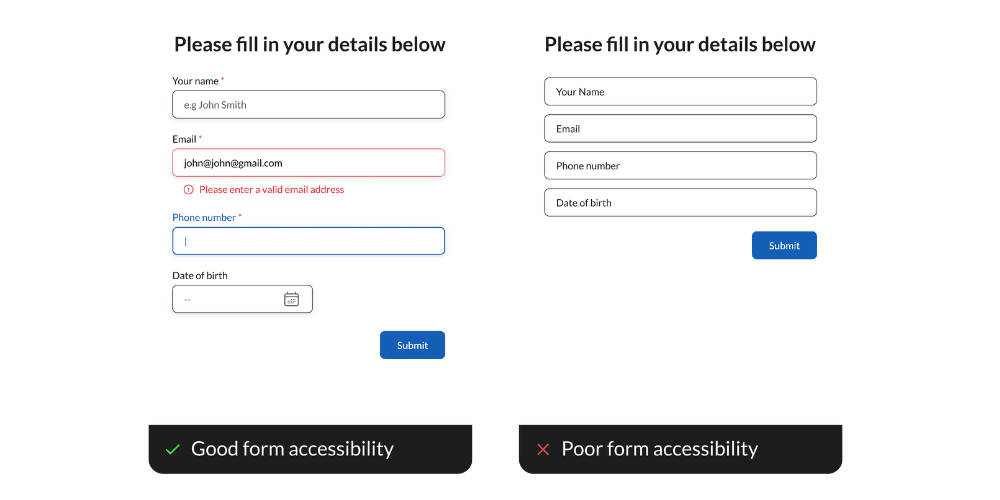
Forms should be clearly labelled. If a user makes an error on a donation form (e.g., invalid email format), the error should be identified in text, and suggestions for correction should be provided. Navigation menus should appear and operate in consistent ways across the website.
Robust and Assistive Technology Friendly Design
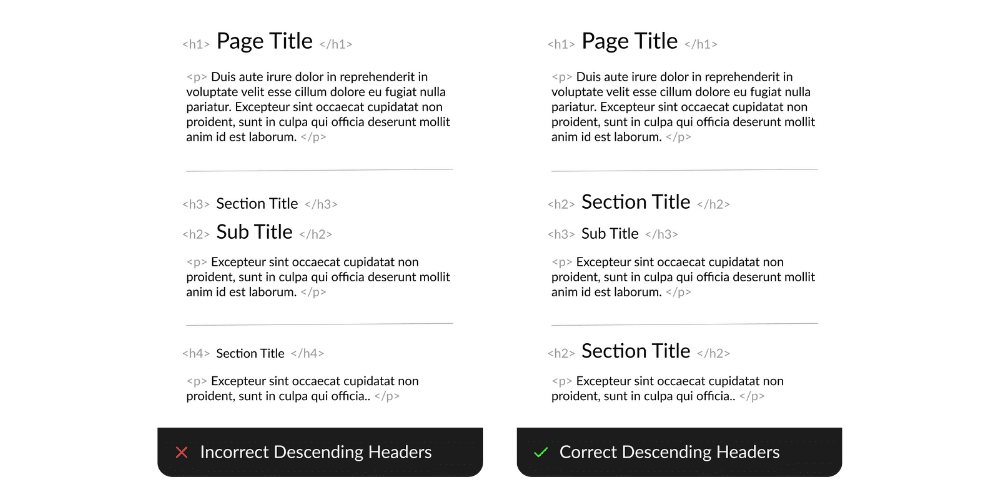
Your website code must be clean and valid so that assistive technologies like screen readers can parse it correctly. This includes using proper semantic HTML tags (like <nav>, <main>, <header>) rather than relying solely on visual styling.
AAA Accessibility: Going Further Than Compliance
Enhanced Perceivability and Readability
AAA standards require a higher contrast ratio of 7:1 for normal text. It also restricts the use of images of text entirely. Audio descriptions must be provided for all video content, or a media alternative (like a full transcript) must be available.
Advanced Keyboard and Focus Controls
Under AAA, keyboard users must be able to restore the keyboard focus to the element that triggered a modal or pop-up after closing it. There are also strict requirements regarding interruptions (pop-ups) and re-authenticating after a session expires without losing data.
Supporting Users With Cognitive Disabilities
AAA guidelines place a heavy emphasis on readability. Content should be written to a lower secondary education reading level. Technical jargon must be defined. This is particularly relevant for charities communicating complex policy or medical information to the general public.
Is AAA Accessibility Right for Your Charity?
Targeting full AAA compliance can be resource-intensive. However, adopting specific AAA criteria, such as simplified reading levels or higher contrast, can significantly benefit your audience without necessarily requiring a complete overhaul of your website.
Accessibility is Not a Box Ticking Exercise
Accessibility Improves User Experience for Everyone
The "curb-cut effect" demonstrates that features designed for disability often benefit everyone - captions on social media videos allow people to watch in silent environments, high-contrast text helps users reading on mobile screens in bright sunlight, clear navigation helps everyone find information faster.
Accessibility, Trust, and Charity Reputation
A commitment to accessibility signals that your charity lives its values. Conversely, an inaccessible website can damage trust. If a user cannot access your annual report or donation page, they may question the organisation's competence or inclusivity.
How Accessible Websites Support Fundraising and Donations
Friction is the enemy of fundraising. Inaccessible forms are high-friction environments, so by ensuring form fields are properly labelled, error messages are helpful, and buttons are large enough to tap, you remove barriers to giving. Accessible websites have been shown to have higher conversion rates because they are easier for everyone to use.
Common Accessibility Barriers on Charity Websites
Text Contrast and Readability
Many charities use brand colours that may not meet contrast requirements when used as text on white backgrounds. For example, light greens or oranges often fail AA standards. It is vital to test brand palettes against WCAG contrast checkers.
Image Alt Text and Media Accessibility
Images often lack descriptive alt text, meaning screen reader users miss out on the visual narrative of your cause. Decorative images should have empty alt attributes (alt="") so they are ignored by screen readers, while meaningful images must have descriptive text.
Forms and Error Handling
Donation forms often rely on visual cues (like a red border) to indicate errors. To be accessible, errors must also be described in text (e.g., "Please enter a valid email address"). Labels must be permanently visible, not just placeholder text that disappears when the user starts typing.
Keyboard Navigation and Focus States
A common failure is the removal of the "focus ring" - the outline that appears around a link or button when selected by a keyboard. This is often removed for aesthetic reasons, but it makes navigation impossible for keyboard-only users.
Mobile Accessibility
With over 50% of web traffic coming from mobile devices, touch targets (buttons and links) must be large enough to be tapped without error. WCAG 2.2 explicitly requires minimum target sizes to prevent users from accidentally activating the wrong feature.
How to Assess and Improve Your Charity’s Website Accessibility
Accessibility Testing Services for Charities
Accessibility testing services for charities typically combine three things: automated scans, expert manual audits, and disabled user testing. Automated tools like WAVE or Google Lighthouse catch a portion of issues - primarily technical problems like missing alt text and contrast failures. Expert manual audits then catch the nuanced problems: is alt text meaningful, is the navigation logical, does the donation flow work with a screen reader? A comprehensive testing service will finish with a prioritised roadmap rather than a raw list of failures.
Disabled User Testing - Research with People with Disabilities
The most effective way to prove accessibility is to test with the people it's meant to serve. Disabled user testing - sessions with screen reader users, keyboard-only users and people with cognitive or motor impairments - surfaces barriers that automated scans never will. For fundraising and donor platforms in particular, testing the donation journey with real assistive technology users is the single highest-value thing you can do. Even a handful of moderated sessions will change how you build.
Publishing an Accessibility Statement
Transparency is key. Publish an accessibility statement on your website detailing your level of compliance, any known limitations, and a mechanism for users to report difficulties. This is a legal requirement for public sector bodies and best practice for all organisations.
Accessible Charity Website Design in Practice
Accessible charity website design isn't a bolt-on at the end of a build - it's a set of decisions made throughout, from wireframes onward. That means brand colours that pass contrast checks before they're locked in, semantic HTML structure at the template level, forms designed with keyboard navigation and error states from the first prototype, and content written to a reading level your audience shares. Retrofitting accessibility onto a finished site is doable, but it's far cheaper and more effective to build it in from the start.
How Atelier Impact Supports Charities With Accessible Websites
Legal obligation and ethical responsibility makes accessibility a priority for every charity. By adhering to WCAG standards and working within the European Accessibility Act, charities can protect their reputation, avoid legal risks, and ensure their message reaches absolutely everyone.
At Atelier Impact, we specialise in accessible digital solutions for charities. We build websites with "accessibility by default," ensuring every project meets WCAG 2.2 AA standards from wireframe to launch. Our comprehensive audits combine automated testing with expert manual review, providing clear roadmaps to compliance.
Additionally, through our Charity Partner Scheme, we offer reduced development rates, free first-year hosting, and ongoing accessibility support tailored to third sector budgets.
Frequently Asked Questions About Website Accessibility for Charities
Do small charities need to comply with accessibility regulations?
Yes. The Equality Act 2010 applies to all service providers, regardless of size. All charities have a legal duty to make reasonable adjustments.
How much does it cost to make a charity website accessible?
The cost of an audit and fixes is entirely dependent on the size and complexity of the site, and the number of issues found. However, building accessibility in from the start is definitely more cost-effective than retrofitting. Many quick wins can be done in-house at minimal cost.
Can we be sued for having an inaccessible website?
Charities can face legal action under the Equality Act 2010 if disabled users cannot access services due to website barriers. Not only this, but inaccessible websites damage reputation and exclude supporters.
What's the difference between automated testing and manual audits?
Automated tools catch some of issues - primarily technical problems like missing alt text or contrast failures. Manual audits use screen readers and assistive technologies to identify nuanced issues machines can't detect.
Do we need to make our PDF documents accessible too?
Yes. PDFs are covered by accessibility legislation. Annual reports, receipts, and policy documents must be accessible or provided in alternative formats like HTML. Build accessibility in from creation rather than retrofitting.
Is it enough to add an accessibility plugin to our website?
No. Overlay tools claiming to "make your site accessible with one line of code" are ineffective and controversial. They cannot fix underlying code issues and may create new barriers. True accessibility requires proper development and testing.
How do we prioritise accessibility improvements with a limited budget?
Start with critical user journeys: homepage, donation forms, and key service pages. Focus on quick wins like text contrast, alt text, and keyboard navigation. Then address forms and error messages before tackling complex features.
What should we include in our accessibility statement?
Include your commitment to accessibility, target standard (e.g., WCAG 2.2 AA), known limitations, how to request alternative formats, feedback mechanism for reporting issues, and date of last review. Place it in your footer navigation.
How often should we test our website for accessibility?
Conduct full audits annually or after significant changes. Make accessibility part of your ongoing development. Test new features before launch, train content editors, and establish a process for users to report issues.
Will making our website accessible affect its design and branding?
Not negatively. Accessibility enhances design through improved clarity and usability. You may need to adjust brand colours for contrast, but these changes improve user experience. Many award-winning websites combine strong branding with excellent accessibility.
What's the difference between AA and AAA accessibility?
AA is the mainstream compliance level and the baseline for UK and EU regulations. It covers the majority of accessibility barriers - keyboard use, colour contrast of 4.5:1, meaningful alt text, clear form errors. AAA is stricter, with higher contrast (7:1), sign language for video, simplified reading levels and stricter timing rules. Most charities aim for AA overall and apply AAA criteria to critical journeys like donation forms.
Do WCAG AAA standards apply to charity websites?
There's no UK law that mandates AAA compliance. AA is the baseline referenced in the Public Sector Bodies Accessibility Regulations and the European Accessibility Act. That said, some AAA criteria - reading level, higher contrast, keyboard focus restoration - are worth adopting on essential pages because they improve the experience for everyone.